Iris, Genie and Pax checked the 37 screens the scan reached in Wikipedia’s Android app. Most of what they found is a short search bar, tabs that don’t say they’re selected and small icons.
37
screens checked in 21 minutes
28
screens with at least one confirmed issue
36 dp
height of the article search bar; Android asks for 48 dp
6
selected feed tabs that don’t tell a screen reader so
14
break a WCAG 2.2 Level A or AA criterion
54
links inside article text, listed but not counted
The three patterns
9 issues
Search bar and field 36 dp tall
Give the search bar and field a 48 dp touch height.
6 issues
Selected tabs that don’t say so
Give the feed tabs a tab role and selected state.
6 issues
Icon buttons under 48 dp
Widen More options and the scroll button to 48 dp.
Illustrative preview of one build of Wikipedia (Android App) for Android, scanned 22 Oct 2026. Not a full audit.
Section 1
Where the issues are
Confirmed issues on
28
of the 37 screens the scan reached
Of 36 confirmed issues,
21
come from three patterns
The scan reached 37 screens of Wikipedia’s Android app, an alpha build, before it was stopped at 21 minutes. Iris, Genie and Pax checked each one.
They reported 104 findings: 85 from Iris and 19 from Genie. 36 were confirmed and 68 were judgement calls. Nine screens had no confirmed issues; seven had no findings.
Reading articles holds 9 confirmed issues and search 8. The same search bar, scroll button and feed tabs repeat across screens, so each is one fix.
Exhibit 1
The same few components repeat across every journey
Confirmed issues on each screen, by journey. Select a screen to see its findings.
Reading articles· 9
Contents· 6
Search· 8
Explore feed· 7
Onboarding and settings· 6
confirmed issuesjudgement calls onlyclean
Exhibit 2
Every finding was reviewed before it reached this report
Findings by review verdict, number of findings (104 reported: 19 by Genie, 85 by Iris)
36 confirmed issues68 judgement calls
Source: Aucert scan of Wikipedia (Android App) for Android, 22 Oct 2026 (scan_7g7x8jhdauxub86); Aucert analysis
Section 2 · Two screens up close
Up close
Search
Exhibit 3
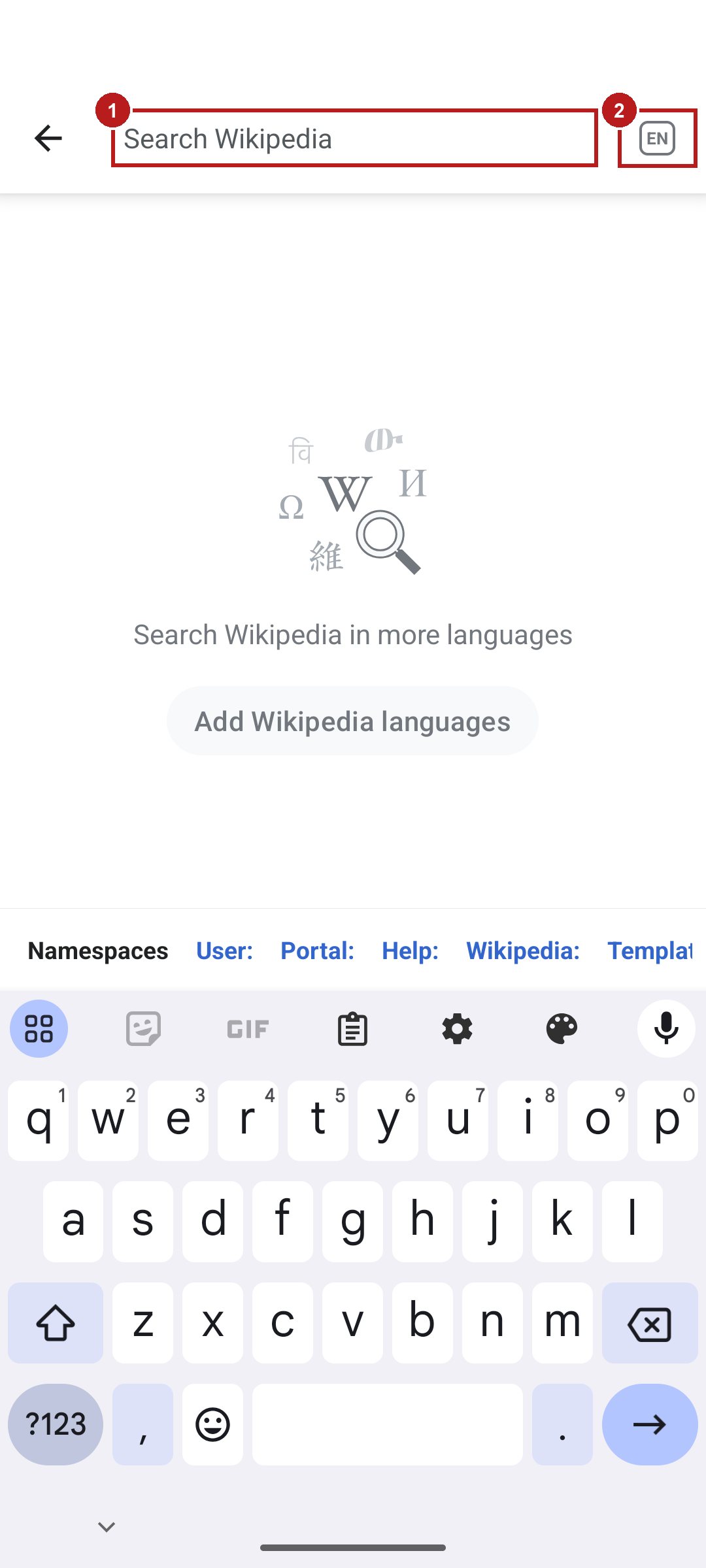
3 confirmed issues: a short search field and the “EN” button
SCREEN-19, where people search Wikipedia, numbered for this report
Iris· Accessibility
ConfirmedJudgement call
1
Search field
285 × 35 dp; Android asks for 48 dp
2
Language button “EN”
48 × 36 dp; Android asks for 48 dp
Named “Wikipedia languages”, so saying “EN” to voice control misses it
Pax· Google Play policy
–
Store policy (whole screen)
162 Google Play policies checked on every screen; none broken
Box 1What fixing this screen takes
1
confirmed issue cleared
Give the search field a 48 dp touch height.
1
confirmed issue cleared
Give the language button a 48 dp touch area.
1
confirmed issue cleared
Put “EN” in the language button’s name.
Source: Aucert scan of Wikipedia (Android App) for Android, 22 Oct 2026 (scan_7g7x8jhdauxub86), screenshot as captured; Google Play developer policy; Aucert analysis
The Explore feed
Exhibit 4
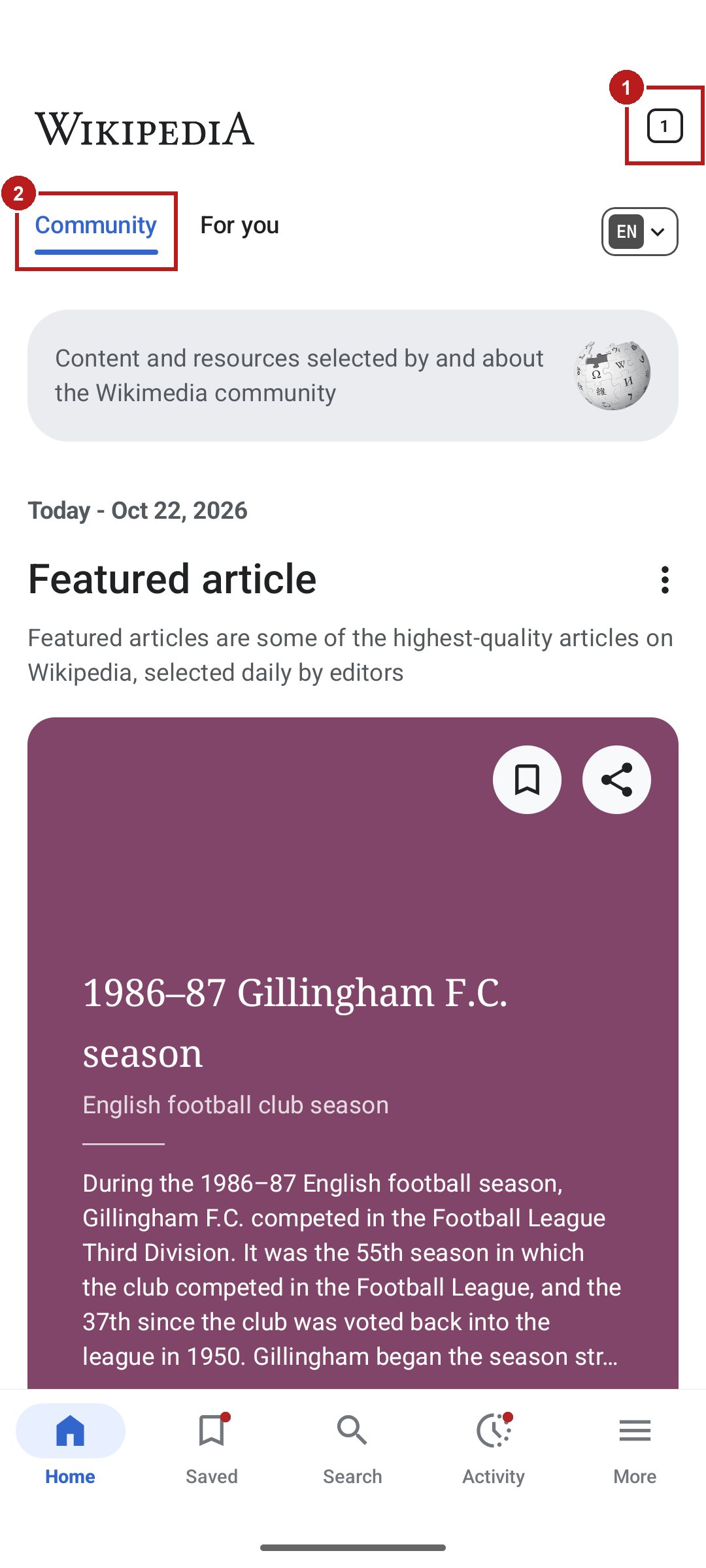
2 confirmed issues: an unnamed Tabs button and a silent tab
SCREEN-17, the Explore feed, numbered for this report
Iris· Accessibility
ConfirmedJudgement call
1
Tabs button, showing “1”
No name, so a screen reader can’t say what it does
2
Community tab
Selected, but exposes no tab role or selected state
Box 2What fixing this screen takes
1
confirmed issue cleared
Name the Tabs button, e.g. “Tabs, 1 open”.
1
confirmed issue cleared
Give the feed tabs a tab role and selected state.
Source: Aucert scan of Wikipedia (Android App) for Android, 22 Oct 2026 (scan_7g7x8jhdauxub86), screenshot as captured; Aucert analysis
Section 3
Why it happens, and what to fix
The same few problems repeat across screens. Fixing a pattern once, in the shared component or the colour token, fixes every screen that uses it.
Exhibit 5
Three patterns cause 21 of the 36 confirmed issues
Confirmed issues by pattern, with the cumulative share
PatternConfirmed issuesCumulative
Search bar and field 36 dp tall925%
Selected tabs that don’t say so642%
Icon buttons under 48 dp658%
Names that don’t match the screen572%
Icon buttons without a name483%
Intro pages without progress or Skip392%
Grammar and capitalization slips297%
Two prompts at once1100%
Exhibit 6
Every failing target is 35–44 dp
Each confirmed failure, against the minimum it misses; green lines are the minimums
Tap targetssmaller side, dp
3 of the 15 are 42–46 dp, within 6 dp of 48.
Box 3A fix plan in three steps
1Now
Give the search bar and field a 48 dp touch height.
Give the feed tabs a tab role and selected state.
Widen More options and the scroll button to 48 dp.
2Next release
Name the Tabs button and the contents scroll button.
Put “EN” in the language button’s name.
Show progress dots and Skip on every intro page.
3Every build
Check new screens: new components bring patterns back.
Re-run the same checks to confirm each fix held.
Source: Aucert scan of Wikipedia (Android App) for Android, 22 Oct 2026 (scan_7g7x8jhdauxub86); Aucert analysis
Section 4
How you compare
Competitor values are placeholders
PLACEHOLDER DATAEvery competitor value in this section is a placeholder that shows the layout, not a measurement of any real app. Wikipedia (Android App)’s own numbers are real. A scan of a chosen competitor’s published app, run the same way, will replace them.
0.78×
Wikipedia (Android App)’s confirmed issues per screen, against the competitor’s PLACEHOLDER
0.41
issues per screen after the three fixes (real), below the competitor’s 1.25 PLACEHOLDER
Exhibit 7
Today and after the three fixes, beside a placeholder competitor
Confirmed issues per screen, lower is better
Wikipedia (Android App) today0.97
Wikipedia (Android App) after the three fixes0.41
CompetitorPLACEHOLDER1.25
Exhibit 8
Issues per screen by type, beside a placeholder competitor
Confirmed issues per screen, by type
Wikipedia (Android App)Competitor PLACEHOLDER
Touch targets
0.41
0.50
Contrast
0.00
0.30
Text in images
0.03
0.25
Labels
0.22
0.20
Box 4How we compare
The competitor is scanned the same way: the same agents and checks, on the same journeys, within the same week.
Until that scan is in, the competitor’s values here are placeholders, and no rank is shown.
The competitor is never named, and no other app is shown.
Exhibit 9
The same journey, side by side: the whole scan
App
Screens
Confirmed issues
Per screen
Smallest target
Lowest contrast
Wikipedia (Android App)
37
36
1.0
35 dp
none failed
Competitor PLACEHOLDER
5
4
0.8
44 dp
4.1:1
Source: Aucert scan of Wikipedia (Android App) for Android, 22 Oct 2026 (scan_7g7x8jhdauxub86). The competitor’s values in this section are placeholders, not measurements of any app.
Section 5
The standards
Of the 36 confirmed issues,
14
break a WCAG 2.2 Level A or AA criterion
Exhibit 10
14 issues break WCAG 2.2; 16 are Android guidance and 6 design guidelines
Confirmed issues by standard, number
WCAG Level A 14Android guidance only 16Aucert design guidelines 6
Exhibit 11
Where the screens fall short, standard by standard
Agent
Standard · criterion
What it asks
Result
Confirmed
Screens
Judgement
1.1.1 Non-text contentWCAG 2.2 · Level A
Images that carry meaning have text; decor is hidden
Fails
2
2
0
2.5.3 Label in nameWCAG 2.2 · Level A
The name includes the visible label
Fails
2
2
0
4.1.2 Name, role, valueWCAG 2.2 · Level A
Controls expose a name, role and state
Fails
10
9
1
Touch target sizeAndroid accessibility guidance
At least 48 × 48 dp
Fails
15
13
54
Role repeated in labelAndroid Accessibility Test Framework
Don’t restate the element type in its label
Fails
1
1
0
Navigation and wayfindingAucert design guidelines
Every tab has an icon and a label in one style
Fails
3
3
3
CopyAucert design guidelines
One capitalization style; no spelling or spacing errors
Walks the app like a user and captures each screen and its accessibility tree.
17policies
Genie, Iris, and Pax check
Iris checked 101 policies, Genie 83, Pax 162.
104findings reviewed
Every finding reviewed
Each one checked against the screenshot and element data. 36 confirmed issues.
Time and credits
21 min
scan time, about 0.57 minutes a screen
111
credits: 37 screens × 3 agents × 1
A credit covers one screen checked by one agent. Exploring the app isn’t counted.
What the verdicts mean
Confirmed · 36. The screen breaks the policy as written.
Judgement call · 68. The evidence is real, but reasonable reviewers could disagree whether it breaks the policy.
Not an issue · 0. The screen complies, or an exemption in the policy applies.
What this preview doesn’t cover
Stopped at 21 minutes, after 37 screens.
2 screens have no screenshot.
Inline article links aren’t counted.
One alpha Android build; no iOS.
Policies with findings
P74Touch target sizeP79Role and stateP78LabelsP1060Visible way forwardP1063Progress and a way outP1067Back controlP11Label in nameP1043Explain disabled controlsP1091Visible hierarchyP20Text alternativesP72Decorative imagesP86Role in labelP1013CapitalizationP1017Copy errorsP1019Truncated textP1020Honest enabled statesP1064One prompt at a time
ILLUSTRATIVEThis report is a limited, automated preview of one build. It is not a full audit or a certification of compliance.
Section 7
Going deeper
Allreachable screens
Every flow
Every screen you can reach, including logged-in areas, using a test account you provide.
6expert agents
More of the bench
Product, engineering, design and validation join accessibility and store policy.
Eachbuild
Every release
The same checks run on each build before it ships, not once.
The expert bench
Ranchecked this previewLiveavailable for a deeper scanSoonjoining the bench
Live
Ember
Product
your sharpest PM
Live
Rio
Engineering
reviews every change like your best senior
Ran
Genie
Design
your pickiest designer
Ran
Iris
Accessibility
sees what users can’t
Live
Vera
Validation
checks every screen does what it promises
Soon
Security
Security
your most paranoid reviewer
Ran
Pax
Google Play policy
knows every Google Play policy
Soon
Ash
Apple App Store policy
knows every App Store review guideline
Soon
Dax
Build Analyzer
inspects every build you upload
Soon
Sage
Steward
coordinates the bench on your behalf
What a deeper scan could take ESTIMATE
~600
credits: 100 screens × 6 agents × 1
~0.7 h
about twice this preview’s 21 minutes
Credits assume an app of about 100 screens. This preview took 21 minutes and 111 credits.
For a deeper, more thorough scan, work with us.
Book a call with the founders
Vivek Soneja and Rajesh Kumar· Co‑founders, Aucert
About Aucert. Aucert is the AI-native validation platform for mobile apps: expert agents that learn your product, encode its expectations, and verify every release before it ships. Not affiliated with the Wikimedia Foundation, Google or Apple. Not legal advice. Findings describe one build of Wikipedia (Android App) for Android, scanned 22 Oct 2026. Deeper-scan figures are estimates, not a quote. Competitor values in “How you compare” are placeholders, not measurements.
Appendix
Every finding, by screen
36 confirmed issues and 68 judgement calls, grouped by screen. Select a row for the detail, or a screen name to see it.
11
P1060Forward arrow, introno visible label
The only way forward is a small arrow in the bottom corner without a visible action label. Review: Icon-only arrow; a common onboarding pattern
P1063Welcome pageno progress or skip
The introduction has neither a progress indicator nor a visible option to skip. Review: No dots or Skip, though intro page 3 has both
11
P1060Forward arrow, introno visible label
The only forward action is a small, unlabeled arrow in the bottom-right corner. Review: Icon-only arrow; a common onboarding pattern
P1063Languages intro pageno progress or skip
This onboarding page shows neither progress nor a visible skip or sign-in option. Review: No dots or Skip, though intro page 3 has both
11
P1060Forward arrow, introno visible label
The only forward control is a small arrow in the bottom-right corner with no visible action label. Review: Icon-only arrow; a common onboarding pattern
P72Curiosity illustrationdecorative, announced
A decorative illustration is exposed with a description that repeats the adjacent heading. Review: Described as “Follow your curiosity”, repeating the heading
1
P79Community tabno role or state
The selected Community tab exposes neither a tab role nor its selected state. Review: Selected tab exposes no tab role or selected state
No issues found
1
P1017Discover setting descriptiongrammar error
The phrase “recommend you articles” uses an incorrect verb pattern. Review: “won’t recommend you articles”
1
P79Community tabno role or state
The selected Community tab is exposed as a generic View rather than a tab. Review: Selected tab exposes no tab role or selected state
No issues found
1
P79“For you” tabno role or state
The visibly selected custom tab exposes neither a tab role nor its selected state. Review: Selected tab exposes no tab role or selected state
1
P86Search history thumbnailrole in label
The image’s accessible label repeats its image role. Review: Named “Image: Jailer 2”
1
P1064Wikipedia games dialogtwo prompts at once
The games introduction dialog appears over an active toolbar coach mark, creating two competing prompts. Review: Opens over the “Customize your toolbar” tip
No issues found
No issues found
11
P79Community tabno role or state
The selected Community tab is exposed as a generic View without a tab role or selected state. Review: Selected tab exposes no tab role or selected state
P1019“On this day” card titletext cut off
The article title is truncated to one line despite room for the card to accommodate wrapping. Review: Cut in a fixed-width carousel card
12
P74More options icon40×48 dp
The overflow control's touch target is only 40dp wide. Review: 40 dp on its short side; Android asks for 48 dp
P1067Tab count as Back, Tabs screenno back control
The Back action is disguised as a tab-count badge rather than a conventional navigation control. Review: Tab count returns; follows the browser convention
P78Close tab buttonssame label twice
Both tab-closing controls share the same accessible label, making their targets indistinguishable by name. Review: Both say “Close tab”, not which tab
1
P79“For you” tabno role or state
The visibly selected For you tab exposes neither a tab role nor its selected state. Review: Selected tab exposes no tab role or selected state
2
#1P78Tabs button, top rightno label
The top-right icon button has no accessible label identifying its action. Review: Icon button with no name
#2P79Community tabno role or state
The selected Community tab is exposed as a generic View without a tab role or selected state. Review: Selected tab exposes no tab role or selected state
3
P74Search field285×35 dp
The search field's touch target is only 36dp high, below the required 48dp. Review: 35 dp on its short side; Android asks for 48 dp
P74Language button “EN”48×36 dp
The language selector's touch target is only 36dp high, below the required 48dp. Review: 36 dp on its short side; Android asks for 48 dp
P11Language button “EN”label not in name
The accessible name omits the visible language label EN. Review: Named “Wikipedia languages” but shows “EN”
31
#1P74Search field285×35 dp
The search field is only 36dp high, below the minimum touch-target height. Review: 35 dp on its short side; Android asks for 48 dp
#2P74Language button “EN”48×36 dp
The language selector is only 36dp high, below the minimum touch-target height. Review: 36 dp on its short side; Android asks for 48 dp
#2P11Language button “EN”label not in name
The accessible name does not contain the visible label “EN”. Review: Named “Wikipedia languages” but shows “EN”
P1020Add Wikipedia languages buttonlooks disabled
The enabled language-add button is styled grey on grey, making it look disabled. Review: Grey on grey; reads as a secondary button
17
P74“1986–87 English football season” link224×19 dp
The inline link is only 19dp high, below the minimum touch-target height. Review: Link inside a sentence; WCAG 2.5.8 exempts inline targets
P74“Gillingham F.C.” link101×19 dp
The inline link is only 19dp high, below the minimum touch-target height. Review: Link inside a sentence; WCAG 2.5.8 exempts inline targets
P74“Football League Third Division” link272×44 dp
The wrapped inline link is only 44dp high, below the minimum touch-target height. Review: Link inside a sentence; WCAG 2.5.8 exempts inline targets
P74“the Football League” link134×19 dp
The inline link is only 19dp high, below the minimum touch-target height. Review: Link inside a sentence; WCAG 2.5.8 exempts inline targets
P74“voted back into the league” link177×19 dp
The inline link is only 19dp high, below the minimum touch-target height. Review: Link inside a sentence; WCAG 2.5.8 exempts inline targets
P74“play-offs” link60×20 dp
The inline link is only 20dp high, below the minimum touch-target height. Review: Link inside a sentence; WCAG 2.5.8 exempts inline targets
P74“promotion” link70×20 dp
The inline link is only 20dp high, below the minimum touch-target height. Review: Link inside a sentence; WCAG 2.5.8 exempts inline targets
P74“Football League Second Division” link221×19 dp
The inline link is only 19dp high, below the minimum touch-target height. Review: Link inside a sentence; WCAG 2.5.8 exempts inline targets
P74“Bristol City” link73×19 dp
The inline link is only 19dp high, below the minimum touch-target height. Review: Link inside a sentence; WCAG 2.5.8 exempts inline targets
P74“Notts County” link88×20 dp
The inline link is only 20dp high, below the minimum touch-target height. Review: Link inside a sentence; WCAG 2.5.8 exempts inline targets
P74“Bolton Wanderers” link120×18 dp
The inline link is only 19dp high, below the minimum touch-target height. Review: Link inside a sentence; WCAG 2.5.8 exempts inline targets
P74“Sunderland” link77×19 dp
The inline link is only 19dp high, below the minimum touch-target height. Review: Link inside a sentence; WCAG 2.5.8 exempts inline targets
P74“Swindon Town” link377×44 dp
The wrapped inline link is only 44dp high, below the minimum touch-target height. Review: Link inside a sentence; WCAG 2.5.8 exempts inline targets
P74“on aggregate” link307×44 dp
The wrapped inline link is only 44dp high, below the minimum touch-target height. Review: Link inside a sentence; WCAG 2.5.8 exempts inline targets
P74“the final” link54×19 dp
The inline link is only 19dp high, below the minimum touch-target height. Review: Link inside a sentence; WCAG 2.5.8 exempts inline targets
P74“replay” link41×19 dp
The inline link measures 42×19dp, below both minimum touch-target dimensions. Review: Link inside a sentence; WCAG 2.5.8 exempts inline targets
P74“neutral venue” link92×19 dp
The inline link is only 19dp high, below the minimum touch-target height. Review: Link inside a sentence; WCAG 2.5.8 exempts inline targets
21
P78Contents scroll buttonno label
The floating contents control exposes no accessible label. Review: Icon button with no name
P74Contents scroll button44×44 dp
The interactive control measures only 44 × 44dp, below the minimum touch-target size. Review: 44 dp on its short side; Android asks for 48 dp
P1091Contents listflat hierarchy
Subsections share their parents’ alignment, obscuring the contents hierarchy and the context of repeated section names. Review: Subsections are smaller but share alignment
No issues found
116
P1043Article toolbardisabled, unexplained
Several bottom-toolbar actions are disabled without an explanation. Review: Greyed while finding in article; may be temporary
P74“Wikipedia” link113×32 dp
The link's 113×32dp target is shorter than 48dp. Review: Link inside a sentence; WCAG 2.5.8 exempts inline targets
P74“free” link28×19 dp
The link's 28×19dp target is smaller than 48×48dp. Review: Link inside a sentence; WCAG 2.5.8 exempts inline targets
P74“anyone can edit” link106×19 dp
The link's 107×19dp target is shorter than 48dp. Review: Link inside a sentence; WCAG 2.5.8 exempts inline targets
P74“271,284” link50×18 dp
The link's 50×18dp target is shorter than 48dp. Review: Link inside a sentence; WCAG 2.5.8 exempts inline targets
P74“7,254,127” link60×16 dp
The link's 60×17dp target is shorter than 48dp. Review: Link inside a sentence; WCAG 2.5.8 exempts inline targets
P74“English” link45×16 dp
The link's 45×17dp target is smaller than 48×48dp. Review: Link inside a sentence; WCAG 2.5.8 exempts inline targets
P74“their 1986–87 season” link159×19 dp
The link's 159×20dp target is shorter than 48dp. Review: Link inside a sentence; WCAG 2.5.8 exempts inline targets
P74“Gillingham F.C.” link107×19 dp
The link's 107×20dp target is shorter than 48dp. Review: Link inside a sentence; WCAG 2.5.8 exempts inline targets
P74“Football League Third Division” link214×19 dp
The link's 215×20dp target is shorter than 48dp. Review: Link inside a sentence; WCAG 2.5.8 exempts inline targets
P74“Swindon Town” link104×20 dp
The link's 105×20dp target is shorter than 48dp. Review: Link inside a sentence; WCAG 2.5.8 exempts inline targets
P74“1987 Third Division final” link172×20 dp
The link's 172×20dp target is shorter than 48dp. Review: Link inside a sentence; WCAG 2.5.8 exempts inline targets
P74“replay” link43×20 dp
The link's 43×20dp target is smaller than 48×48dp. Review: Link inside a sentence; WCAG 2.5.8 exempts inline targets
P74“FA Cup” link51×19 dp
The link's 51×20dp target is shorter than 48dp. Review: Link inside a sentence; WCAG 2.5.8 exempts inline targets
P74“Football League Cup” link147×19 dp
The link's 147×20dp target is shorter than 48dp. Review: Link inside a sentence; WCAG 2.5.8 exempts inline targets
P74“Associate Members' Cup” link349×46 dp
The link's 349×46dp target is shorter than 48dp. Review: Link inside a sentence; WCAG 2.5.8 exempts inline targets
P74Search bar, article toolbar255×36 dp
The search control's 255×36dp target is shorter than 48dp. Review: 36 dp on its short side; Android asks for 48 dp
2
P78Contents scroll buttonno label
The floating icon control has no accessible label. Review: Icon button with no name
P74Contents scroll button44×44 dp
The floating control's 44×44dp touch target is smaller than 48×48dp. Review: 44 dp on its short side; Android asks for 48 dp
No issues found
11
P74More options icon40×48 dp
The overflow control is only 40dp wide, below the minimum 48dp touch target. Review: 40 dp on its short side; Android asks for 48 dp
P1067Tab count as Back, Tabs screenno back control
The Back action is disguised as a tab-count badge on the opposite side of the header. Review: Tab count returns; follows the browser convention
1
P1067Link preview sheetno close control
The article preview sheet has no visible back or close control. Review: A bottom sheet, dismissed by swiping down
21
P78Contents scroll buttonno label
The floating icon control has no accessible label. Review: Icon button with no name
P74Contents scroll button44×44 dp
The floating control's reported touch target is only 44dp by 44dp. Review: 44 dp on its short side; Android asks for 48 dp
P1091Contents listflat hierarchy
Parent sections and their subsections share the same indentation, weakening the table of contents hierarchy. Review: Subsections are smaller but share alignment
117
P74Search bar, article toolbar255×36 dp
The search control is only 36dp tall. Review: 36 dp on its short side; Android asks for 48 dp
P74“1986–87 English football season” link224×19 dp
The article link is only 19dp tall. Review: Link inside a sentence; WCAG 2.5.8 exempts inline targets
P74“Gillingham F.C.” link101×19 dp
The article link is only 19dp tall. Review: Link inside a sentence; WCAG 2.5.8 exempts inline targets
P74“Football League Third Division” link272×44 dp
The wrapped article link is only 44dp tall. Review: Link inside a sentence; WCAG 2.5.8 exempts inline targets
P74“the Football League” link134×19 dp
The article link is only 19dp tall. Review: Link inside a sentence; WCAG 2.5.8 exempts inline targets
P74“voted back into the league” link177×19 dp
The article link is only 19dp tall. Review: Link inside a sentence; WCAG 2.5.8 exempts inline targets
P74“play-offs” link60×20 dp
The article link is only 20dp tall. Review: Link inside a sentence; WCAG 2.5.8 exempts inline targets
P74“promotion” link70×20 dp
The article link is only 20dp tall. Review: Link inside a sentence; WCAG 2.5.8 exempts inline targets
P74“Football League Second Division” link221×19 dp
The article link is only 19dp tall. Review: Link inside a sentence; WCAG 2.5.8 exempts inline targets
P74“Bristol City” link73×19 dp
The article link is only 19dp tall. Review: Link inside a sentence; WCAG 2.5.8 exempts inline targets
P74“Notts County” link88×20 dp
The article link is only 20dp tall. Review: Link inside a sentence; WCAG 2.5.8 exempts inline targets
P74“Bolton Wanderers” link120×18 dp
The article link is only 19dp tall. Review: Link inside a sentence; WCAG 2.5.8 exempts inline targets
P74“Sunderland” link77×19 dp
The article link is only 19dp tall. Review: Link inside a sentence; WCAG 2.5.8 exempts inline targets
P74“Swindon Town” link377×44 dp
The wrapped article link is only 44dp tall. Review: Link inside a sentence; WCAG 2.5.8 exempts inline targets
P74“on aggregate” link307×44 dp
The wrapped article link is only 44dp tall. Review: Link inside a sentence; WCAG 2.5.8 exempts inline targets
P74“the final” link54×19 dp
The article link is only 19dp tall. Review: Link inside a sentence; WCAG 2.5.8 exempts inline targets
P74“replay” link41×19 dp
The article link measures only 42×19dp. Review: Link inside a sentence; WCAG 2.5.8 exempts inline targets
P74“neutral venue” link92×19 dp
The article link is only 19dp tall. Review: Link inside a sentence; WCAG 2.5.8 exempts inline targets
11
P74“1986–87 English football season” link224×19 dp
Inline article links have touch targets shorter than 48dp. Review: Link inside a sentence; WCAG 2.5.8 exempts inline targets
P74Search bar, article toolbar255×36 dp
The search control's touch target is only 36dp tall. Review: 36 dp on its short side; Android asks for 48 dp
1
P74More options icon40×48 dp
The More options control is only 40dp wide, below the required 48dp touch target. Review: 40 dp on its short side; Android asks for 48 dp
11
P1063Data & Privacy intro pageno progress or skip
The onboarding page has no progress indicator or visible way to skip this informational step. Review: No dots or Skip, though intro page 3 has both
P1060Forward arrow, introno visible label
The only forward action is a small icon-only arrow in the bottom-right corner. Review: Icon-only arrow; a common onboarding pattern
1
P1013Search widget headingmixed capitalization
The heading mixes title-case capitalization with a lowercase principal word. Review: “A Faster way to Search”
11
P74“1986–87 English football season” link224×19 dp
Inline article links have touch targets smaller than 48dp high. Review: Link inside a sentence; WCAG 2.5.8 exempts inline targets
P74Search bar, article toolbar255×36 dp
The search control's reported touch target is only 36dp high. Review: 36 dp on its short side; Android asks for 48 dp
11
P74Search bar, article toolbar255×36 dp
The search control and inline article links have touch targets smaller than 48dp high. Review: Reported with inline links; the search bar fails
P1043Article toolbardisabled, unexplained
Several bottom toolbar actions are disabled without any visible explanation. Review: Greyed while the page loads; may be temporary
13
P20Article lead imageno text alternative
The informative article photograph has no text alternative. Review: Informative photo with no description
P74Inline article link101×19 dp
The inline link's touch target is only 101 by 19dp. Review: Link inside a sentence; WCAG 2.5.8 exempts inline targets
P74“[a]” link13×15 dp
The footnote link's touch target is only 13 by 15dp. Review: Link inside a sentence; WCAG 2.5.8 exempts inline targets
P74“Trollhättan” link73×19 dp
The inline location link's touch target is only 74 by 19dp. Review: Link inside a sentence; WCAG 2.5.8 exempts inline targets
No issues found
The # column matches the numbered boxes on the annotated screenshots.
Source: Aucert scan of Wikipedia (Android App) for Android, 22 Oct 2026 (scan_7g7x8jhdauxub86)
Wikipedia (Android App) Android app review
The formatted report is the 13-page PDF: use “Download PDF” on the page, or open Wikipedia-Android-App-Android-app-review-Aucert.pdf beside this page.


 Iris· Accessibility
 Pax· Google Play policy




 Soon
 Soon
 Soon
 Soon